2010年8月26日木曜日

Using Emgu CV on Mac OSX


Yesterday, I thought of trying to run Emgu CV on Mac OSX.
I write what I did for that here.

*Emgu CV is a OSS Open CV wrapper for .Net framework.

OS: Mac OSX Snow Leopard (10.6.4) failed
Mac OSX Leopard(10.5.8) succeed!

1. Installing Mono and Monodevelop (for now you dont really need Monodevelop)

== Japanese problem ==
You need to specify a font that can be used for your own language if you are using Multi-bytes.
Create next file with admin authority.
/Library/Frameworks/Mono.Framework/Version/Current/etc/pango/pango.aliases
Write a line like below.
"Lucida Grande" = "Hiragino Kaku Gothic Pro"
==================

2. Installing depending libraries via Macports
sudo port selfupdate
sudo port upgrade outdated
sudo port install cmake
sudo port install ffmpeg
sudo port install tiff
3. Get a source code from SVN repository
svn co https://emgucv.svn.sourceforge.net/svnroot/emgucv/trunk emgucv
4. Creating make file by cmake
cmake -DBUILD_NEW_PYTHON_SUPPORT:BOOL=FALSE -DBUILD_TESTS:BOOL=FALSE .

5. Executing make
make
6. Running samples
move to bin directory
set value to read library from current directory

export LD_LIBRARY_PATH=.:$LD_LIBRARY_PATH
execute a sample
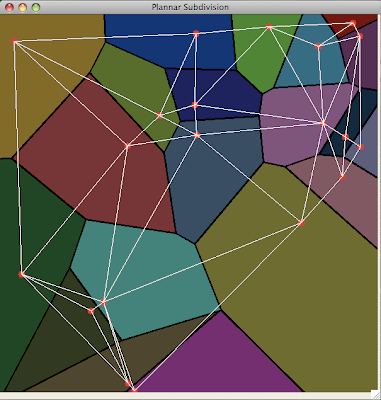
mono Example.PlanarSubdivision.monoexe
Error!
System.DllNotFoundException
7. Setting Log level and execute again
MONO_LOG_LEVEL=debug mono Example.PlanarSubdivision.monoexe
It seems 64bit is not supported by Mono 2.6.7 so that it is hard to run on Snow Leopard.

8. Trying to build with 32bit option
cmake -DCMAKE_OSX_ARCHITECTURES=i386 -DBUILD_NEW_PYTHON_SUPPORT:BOOL=FALSE -DBUILD_TESTS:BOOL=FALSE .
got an error at make command.
It said something like Open CV should be 64bit...

hmm, I gave up with Snow Leopard ...

9. Trying with Leopard (10.5.8)
Mostly same as above however library path was different so set as below.
export LD_LIBRARY_PATH=../lib:.:$LD_LIBRARY_PATH
I could run the sample!

2010年7月18日日曜日

Tomcat 6 grant setting for GWT, Lucene, JPA, HIbernate and Spring Framework

WIth Ubuntu 10.04,

Running GWT on Tomcat6 with Lucene, JPA, Hibernate and Spring Framework,
you need to grant many permissions.

Write in, "04webapps.policy"

grant {

permission java.util.PropertyPermission "user.dir", "read";
permission java.util.PropertyPermission "org.apache.lucene.lockDir", "read";
permission java.util.PropertyPermission "sun.arch.data.model", "read";
permission java.util.PropertyPermission "org.apache.lucene.store.FSDirectoryLockFactoryClass", "read";
permission java.util.PropertyPermission "org.apache.lucene.analysis.standard.StandardAnalyzer.replaceInvalidAcronym", "read";
permission java.util.PropertyPermission "cglib.debugLocation", "read";
permission java.util.PropertyPermission "ANTLR_DO_NOT_EXIT", "read";
permission java.util.PropertyPermission "ANTLR_USE_DIRECT_CLASS_LOADING", "read";


//Required for Spring Framework
permission java.lang.RuntimePermission "createClassLoader";
permission java.lang.reflect.ReflectPermission "suppressAccessChecks";
permission java.lang.RuntimePermission "getProtectionDomain";
permission java.net.SocketPermission "127.0.0.1:3306","connect,resolve,listen,accept";
permission java.net.SocketPermission "localhost:3306","connect,resolve,listen,accept";

Linux and Proxy setting notes

Linux & proxy settings are always very bothersome to search.

[apt-get] export command or set as a environmental variable
export http_proxy=http://[address]:[port]/

[wget] xport command or set as a environmental variable
export http_proxy=http://[address]:[port]/

[yum] 環xport command or set as a environmental variable
export http_proxy=http://[address]:[port]/

[rpm] use command line options
rpm --httpproxy [address] --httpport [port]

Ubuntu 10.04 sudo via ssh

When you try to send sudo command via ssh, I got this message.
sudo: no tty present and no askpass program specified

There are some entries that says you should comment out "Defaults requiretty" from /etc/sudoers, however, there is no such line in the file for Ubuntu 10.04.

Writing "Defaults visibletty" works fine although you password will be visible when you type.

It didn't sound the best solution and I found out that using "-t" option for ssh command is better way. Then the command will be something like this.

ssh -t [address] sudo shutdown -h now

In addition,
Writing the following like in "/etc/sudoers" will let you "sudo" without prompting password request.
username ALL=NOPASSWD: ALL

2010年3月1日月曜日

Japanese Morphological Analyzer on GAE

I made a Japanese morphological analyzer on Google Apps Engine.

You can input Japanese sentences and then you will see the analysis result.
http://onlinejpanalyser.appspot.com/sen/

I used Slim3 that is a full-stack MVC framework optimized for Google App Engine/Java.
Also, I used Sen to analyze Japanese sentences.

2009年10月31日土曜日

Hadoop Plugin for Eclipse 3.5.1 Galileo

Recently I started trying Apache Hadoop and there were some people wrote about Eclipse Plugin.I checked out latest source code but it seems they didn't include the plugin no longer, so I checked out version 0.19.2 that was the newest one I found that had the plugin.

I tried with hadoop 0.19.2 however the plugin didn't work well on Eclipse 3.5.1 Galileo.
The error log said they couldn't find a class and couldn't instanciate the plugin when they try to run Hadoop program. I looked through the source and found that was using "internal" class. It seemed the class was no longer in the latest Eclipse. I changed "import" sentences, fixed one bug about null checking and finally got the plugin working.

===========================
The system specification was :

Host OS : Mac OSX 10.5
Guest OS on VMware : Ubuntu 9.04

Eclipse 3.5.1 Galileo
Hadoop 0.19.2
===========================

I uploaded the fixed plugin here. In case, if anyone is trying to use the plugin, the following that I write about installation and usage will help.


First, you need to install Hadoop. I prefere downloading not the latest but version 0.19.2.
Quick Start will help greatly. Latest one( currently 0.20.1 ) is using separated files for configuration however you can just find same entries in conf/hadoop-site.xml (you might need to copy from hadoop-default.xml first time ) . Please run hadoop and create directory input on Hadoop File System (HDFS) before you go to next step. You may also want't to copy some text files in it as it is done in Quick Start.

Second, download the plugin and copy it in "plugins" directory then start Eclipse. You will see "Map/Reduce Project" when you try to create "New Project". However, you can't create its project until you configure the plugin. So, open "Preference -> Hadop Map/Reduce" and set Hadoop installed directory(fig 1). Finally we can start creating and run Hadoop project.

fig 1 : Setup Hadoop installed directory
  1. Create new Hadoop Project then Eclipse will lead you to Hadoop Plugin Perspective. Now, you can see blue elephant icons.
  2. Open "Window->Show View->Other->MapReduce Tools->Map/Reduce Locations"(fig 2).
  3. Click "Blue Elephant" in "Map/Reduce Locations" view and define Hadoop location. For testing you need to edit "Location Name", "Host" and "Port" in General tab, also you need to set "eclipse.plugin.jobtracker.host", "eclipse.plugin.jobtracker.port", "fs.default.name" (fig 3, 4).
  4. Check if you can connect to HDFS from Eclipse. In "Project Explorer", open DFS Locations.
  5. Create Hadoop programs (you can use this sample) and try running them. You can select a class that has main and "Right Click -> Run As ->Run on Hadoop" (fig 5).
  6. Choose Location and Finish then you will see Hadoop outputs in Console.
fig 2 : Map/Reduce Location View and DFS Explorer

fig 3, 4 : Hadoop Location setup


fig 5 : Running Hadoop Program


2009年9月2日水曜日

NyArtoolkit on jMonkeyEngine

I was trying to use jMonkeyEngine for a 3D engine with NyArtoolkit these few days. I uploaded my first result on Youtube.

jMonkeyEngine is a 3D game engine written in Java. It supports many features such as collisions, particle systems, shaders, terrain system and so on.


Here, I put my source codes however I modified original NyARToolkit utils library for a compatibility between mac and windows so they might not work. If you have any question, feel free to ask.